Music projects ask different things from a website. A solo artist may need one place for a new single and social links. A promoter needs to get people to tickets. A venue needs its next line-up in view before anyone scrolls.
Choose a layout by the action you need the visitor to take. The reviews below explain where each template fits and the first changes to make after you choose it.
Pick the job before the style
Start with DJ Website when bookings matter. Choose One Page Music or Minimal Music when you have one release or one artist to promote. Pick Music Promoter or either Nightclub template for events. Record Label and Artist Rooster Music suit projects with several artists or releases.
Best for solo artists
1. Music Artist: a home for your sound and identity
Music Artist gives a singer, producer or performer a visual starting point that feels more intentional than a generic portfolio. Use it when your name, image and newest work need to sit together in one place.
Replace the demo image with one recognisable artist photo. Add your newest release, a short bio and direct links to the platforms where you want listeners to go.
View in the Music collection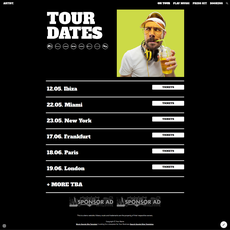
Best for artist projects with a stronger visual direction
2. Music Artist 2: shape a recognisable artist profile
Music Artist 2 works for artists who want the site to carry more of the project’s visual character. It gives you room to connect a release, appearances and social channels without treating the page like a list of links.
Use a small set of images from the same shoot. Keep the copy short, then give the main button one job: listen, watch or follow.
View in the Music collection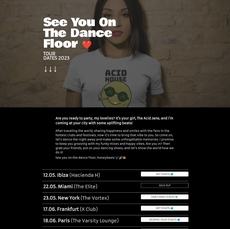
Best for booking enquiries
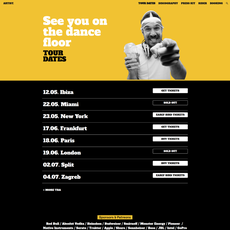
3. DJ Website: give promoters a clear reason to contact you
Use DJ Website when a venue, festival or promoter needs to understand your sound and find a booking route without digging through your socials. It suits DJs, producers and performers with shows to promote.
Put a current mix or release near the top. List the next dates you can confirm, then make your booking email or form hard to miss.
View in the Music collection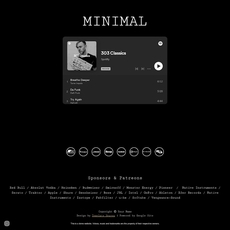
Best for a simple artist site
4. Minimal Music: keep the attention on the work
Minimal Music suits a solo musician with one strong message: a release, an artist profile or a short selection of work. The restrained direction helps the music and images lead the page.
Do not fill every space. Use one portrait or artwork image, one current link and one contact route. Add more only when a visitor needs it to listen or get in touch.
View in the Music collection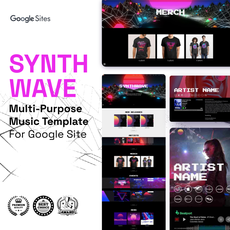
Best for a larger music brand
5. Music Multipurpose: one site for a project that is growing
Music Multipurpose gives an artist brand, producer, label or entertainment project more room to bring releases, people and links together. Pick it when a one-page profile feels too narrow.
Start with the current release or event. Add the rest of the project in order of importance, so visitors can move from the headline item into your wider work.
View in the Music collection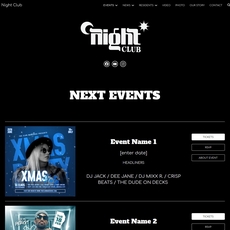
Best for late-night events and venues
6. Nightclub Dark: make the next night feel close
Nightclub Dark suits a club, party series or music venue that needs a focused atmosphere before a visitor reaches the ticket link. Its direction works when the event itself needs to feel immediate and distinct.
Lead with the next date, the line-up and a direct ticket button. Keep past events farther down the page so they do not compete with the next one.
View in the Music collection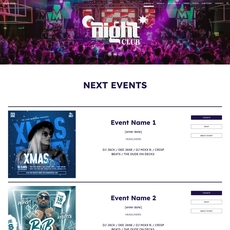
Best for an open, energetic venue brand
7. Nightclub Light: promote a line-up without losing clarity
Nightclub Light gives a venue or event brand a brighter direction while keeping the focus on performers and dates. Use it when you want the page to feel welcoming without diluting the energy of the event.
Bring your event colours into the page, then use a consistent image treatment for each artist or headliner. Visitors should find the date and ticket link in a few seconds.
View in the Music collection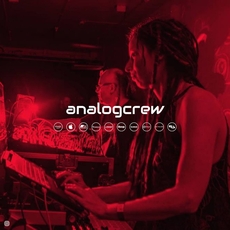
Best for one release or campaign
8. One Page Music: put one action in front of listeners
One Page Music works when the page has one purpose: launch a release, introduce an artist or collect attention around one campaign. A focused page makes sense when visitors should listen, follow or contact you next.
Choose one main button and repeat it where the page gets longer. A short artist introduction and a few strong visuals will do more than a long archive of past work.
View in the Music collection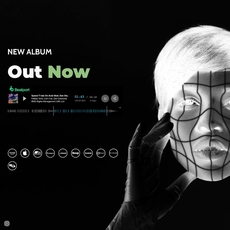
Best for concerts and music announcements
9. Music Promoter: turn attention into ticket clicks
Music Promoter gives a concert, release or event series a campaign-led home. Use it when the announcement and its atmosphere need to work together before a visitor reaches tickets or the next update.
Make the current event the first thing on the page. Put the date, city and ticket link beside it, then use the supporting content to explain the line-up and build anticipation.
View in the Music collection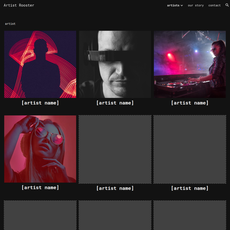
Best for collectives and agencies
10. Artist Rooster Music: introduce several artists with context
Artist Rooster Music suits a label, collective, agency or management project that represents more than one person. It helps you present the group as a whole, then guide visitors into individual artists and releases.
Give each artist the same amount of useful information: a photo, a short description and one place to hear or learn more. That keeps the roster easy to scan.
View in the Music collection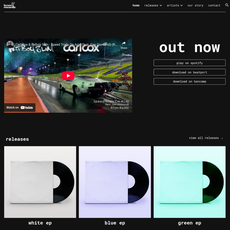
Best for labels and music brands
11. Record Label: connect releases, artists and merchandise
Record Label gives an independent label or music brand an organised place to feature a current release, point visitors to artists and direct people to catalogue or merchandise links.
Use the first screen for the newest release. Keep artist pages and catalogue links easy to reach, then include a direct contact route for demos, press or partnerships.
View in the Music collectionBrowse the Music collection
Open the collection to compare the live previews and choose the template that fits your next release, booking cycle or event.
Explore Music templatesFAQ
Questions about Google Sites music templates
Which template should a DJ choose?
Start with DJ Website if booking enquiries and upcoming dates matter most. Choose One Page Music when you need a focused launch page for a mix, release or campaign.
What should a musician put on their website?
Add a short introduction, one current release or announcement, direct music links, upcoming dates when you have them and a clear contact or booking route.
Can a record label use Google Sites?
Yes. Record Label and Artist Rooster Music provide a starting structure for presenting artists, releases, catalogue links and contact information.
Do I need every section in a template?
No. Remove sections that do not help a visitor listen, attend, book or contact you. A focused page gives visitors a faster route to the important action.